

What is ACH?
ACH (Automated Clearing House) is a system for transferring money directly between bank accounts. Instead of using a credit card, customers provide their bank account number and routing number, and you withdraw money directly from their checking or savings account. It is commonly used for recurring billing, subscriptions, and invoice payments. Note: ACH Direct Debit is not a real-time transaction. Funds settlement typically takes several business days, and transaction status may remain pending for a period of time.Why Use ACH Instead of Credit Cards?
Advantages:- Lower fees: ACH typically costs much less than credit card processing fees (often just a few cents vs. 2-3% for cards)
- Better for large amounts: No percentage-based fees means ACH is great for large transactions
- Recurring billing: Perfect for subscriptions, monthly bills, and recurring payments
- No chargebacks: ACH has different dispute rules than credit cards (though customers can still reverse payments)
- Not instant: Takes 1-5 business days to process (unlike credit cards which are immediate)
- Can fail silently: You might not know if it failed for several days
- Requires bank account info: Customers need to provide routing and account numbers
When to Use ACH
Good use cases:- Recurring bills: Monthly subscriptions, utility bills, membership fees
- Large transactions: Where credit card fees would be expensive
- B2B payments: Business-to-business transactions
- Customers who prefer it: Some customers prefer bank transfers over credit cards
- Instant purchases: E-commerce where customers expect immediate confirmation
- Small one-time purchases: Credit cards are usually easier for customers
- When you need immediate funds: If you need money right away, use credit cards
Why Does ACH Take Days?
Unlike credit cards (which are processed instantly through card networks), ACH uses a batch processing system. Here’s why it takes time:- Batches are processed in groups: Banks don’t process ACH transactions one-by-one. They collect transactions throughout the day and process them in batches (usually overnight).
- Multiple banks involved: Your bank, the customer’s bank, and the ACH network all need to coordinate. This takes time.
- Business days only: ACH doesn’t process on weekends or holidays. If you submit on Friday, it might not process until Monday or Tuesday.
- Verification time: Banks need time to verify the account exists, has sufficient funds, and isn’t frozen.
- Day 1: You submit the ACH request → Status:
Pending - Day 2-3: Banks process the batch → Still
Pending - Day 3-5: Final confirmation → Status changes to
PaidorNoncollectable
The ACH Object
To process an ACH payment, you need to collect the customer’s bank account information:Understanding the Fields
Security Note: Bank account information is sensitive. Make sure you’re using HTTPS, storing it securely, and following PCI-like security practices. Consider using Revolv3’s payment method storage (tokenization) so you don’t have to store account numbers yourself.
ACH Transaction Lifecycle
ACH transactions go through a predictable lifecycle. Understanding this helps you build a better user experience:1. Pending (Initial Status)
What it means: The ACH request has been submitted to the bank, but we haven’t received final confirmation yet. When you’ll see it: Immediately after submitting the payment, and for the next 1-5 business days. What to do:- Show a “processing” message to the customer
- Don’t fulfill the order yet—wait for confirmation
- Set up webhooks to be notified when status changes
2. Paid (Success)
What it means: The bank successfully processed the ACH and money has been withdrawn from the customer’s account. When you’ll see it: After 1-5 business days, when the bank confirms the transaction succeeded. What to do:- Show success message to customer
- Fulfill the order (ship product, activate service, etc.)
- Update your records
3. Noncollectable (Failed)
What it means: The ACH failed and money was not withdrawn. The bank rejected the transaction. When you’ll see it: After 1-5 business days, when the bank confirms the transaction failed. Common reasons:- Insufficient funds in customer’s account
- Invalid account number or routing number
- Account is closed or frozen
- Customer’s bank rejected it for fraud prevention
- Notify the customer that payment failed
- Ask them to try a different payment method or update their bank account
- For subscriptions, you might pause the subscription and notify them
4. RefundPending (For Refunds)
What it means: You issued a refund via ACH, and it’s being processed. When you’ll see it: After you submit a refund request, while it’s being processed. What to do: Wait for it to complete. It will change to a final status once processed.Webhooks: Essential for ACH
Since ACH takes days to process, you must use webhooks to know when the status changes. You can’t just check the status immediately after submitting—you need to wait for the bank to process it.Set up the InvoiceStatusChanged webhook to receive notifications when:
- ACH payment succeeds (
Paid) - ACH payment fails (
Noncollectable) - Status changes for any reason
Important: Always implement webhooks for ACH payments. Don’t rely on checking status immediately—it will still be Pending for days.
Account Verification: Verify Before You Charge
Before processing an ACH payment, it’s highly recommended to verify the bank account. This helps:- Reduce fraud
- Prevent failed transactions
- Catch invalid account numbers early
How Verification Works
-
Choose a verification provider in the Revolv3 portal (Settings → Merchant Settings):
- GIACT: Validates account ownership and status
- Worldpay: Alternative verification provider
 Call the verification API before processing the payment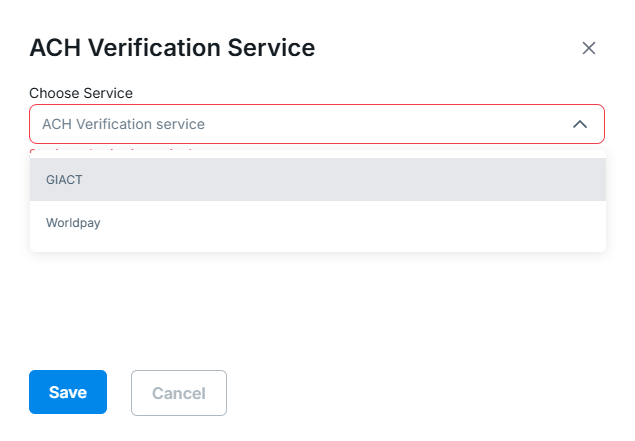
- Check the response: If verification fails, don’t proceed with the debit
- If verification passes: Proceed with confidence (though it’s still not 100% guaranteed to succeed)
Best Practice: Always verify accounts before the first ACH payment, especially for recurring billing. It saves you and your customers time and frustration.View account verification API documentation
Processing Time: What to Expect
ACH is a batch-based system, which means:- Transactions are grouped: Banks collect ACH requests throughout the day and process them in batches (usually overnight)
- Business days only: No processing on weekends or federal holidays
- Multiple steps: Your bank → ACH network → customer’s bank → confirmation back to you
- Submitted Monday: Might process Tuesday-Wednesday
- Submitted Friday: Might not process until Monday-Tuesday (skips weekend)
- Holiday week: Could take longer
Real-World Example: Monthly Subscription
Let’s walk through a subscription service that bills monthly via ACH:Day 1: Billing Date
You submit the ACH payment:- Show customer: “Your payment is processing (takes 1-5 business days)”
- Set up webhook listener for status changes
- Don’t activate/extend their subscription yet
Day 3: Payment Succeeds
Webhook notification arrives:- Extend customer’s subscription
- Send confirmation email
- Update your records
Alternative: Day 4: Payment Fails
Webhook notification:- Pause customer’s subscription
- Send email: “Payment failed. Please update your payment method.”
- Give them a grace period to fix it
Best Practices for ACH
- Always verify accounts first: Especially for recurring billing
- Set up webhooks: Essential for knowing when status changes
- Set customer expectations: Tell them it takes 1-5 business days
- Don’t fulfill immediately: Wait for
Paidstatus before shipping/activating - Handle failures gracefully: Have a plan for when payments fail
- Use for the right use cases: Recurring bills, large amounts, B2B
- Store payment methods: Use tokenization so customers don’t re-enter bank details
ACH vs. Credit Cards: Quick Comparison
Common Questions
Q: Can I make ACH instant? A: No, ACH is inherently a batch system. If you need instant payments, use credit cards or other real-time payment methods. Q: What if the customer doesn’t have enough funds? A: The payment will fail withNoncollectable status after a few days. You’ll need to retry or ask for a different payment method.
Q: Can I refund an ACH payment? A: Yes, but refunds also take 1-5 business days to process. The customer will see the money back in their account after processing.
Q: Is ACH more secure than credit cards? A: Both have security considerations. ACH requires bank account numbers (sensitive), but has different fraud patterns than credit cards. Use proper security practices for both.
Next Steps
- Payment Methods Guide — Learn how to store ACH payment methods securely
- Subscriptions — Set up recurring ACH billing
- Webhooks — Set up status change notifications
- Account Verification API — Verify bank accounts before charging