

1. Overview
The Revolv3 Web SDK lets you collect credit card details on your own checkout page without the raw card number, expiry, or CVV ever touching your JavaScript. Card inputs render inside a cross-origin iframe hosted by Revolv3; your page only ever sees tokenized results and field-level state (empty/complete/valid/error), never the underlying values. The recommended path istokenize in the browser, then charge from your server with the Payments API. Persist paymentMethodId on the shopper’s server session. That id is sequential, and nothing on the payment method identifies the checkout, so do not treat a later id posted by the page as proof it was tokenized here.
sale and authorize charge from the browser instead. Those run inside the hosted iframe, because that is where the raw card data lives. saleWithPaymentMethod and authorizeWithPaymentMethod charge an already saved id from the page. Prefer the server-side charge after tokenize.
0.0.5. Do not use /latest in production. 0.0.4 is still published and was not overwritten. Prefer the ESM build and the named export init. The same URL is used for sandbox and production. environment selects the API and hosted-fields origins.
sha384-lHMTgK3Br1/THcR+jGWiJVPr6KVatjfpyT9a1xDfXcbfDXlfTkYIkO6qoDhJKDVx. Use it with Subresource Integrity when your tooling supports SRI for module imports.
If you cannot use ES modules, load the UMD build instead. It exposes Revolv3WebSdk.init (not Revolv3.init):
init import above.
2. Quick Start
Step 1 — Mint a session and payment key (your backend)
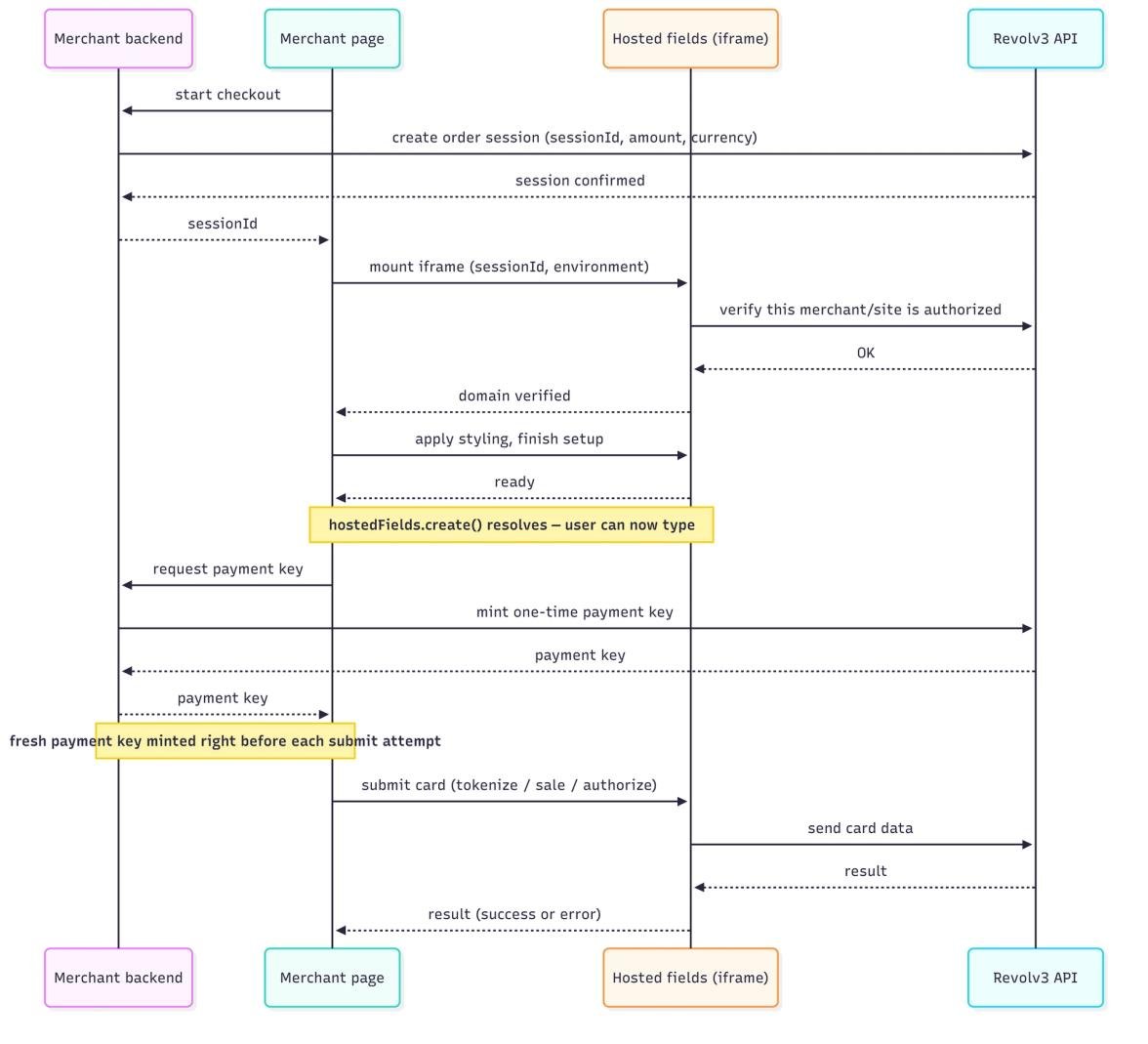
Before any client-side code runs, your backend — authenticated the same way it already authenticates to the rest of the Revolv3 API — must call two Revolv3 endpoints. 1. Register a session for this checkout attempt. Call this from your backend with the same static key you use for the rest of the Revolv3 API. Sandbox host:https://api-sandbox.revolv3.com. Production host: https://api.revolv3.com.
statusType is Pending, Processing, Completed, Failed, or Expired. A session that has already been used returns Completed. That value used to be Paid. Completed means the session was used, not that the payment was approved. Use the sale or authorization result for approval or decline.
Do not send customerId on this request. It is not stored on the payment method. Stamp the checkout with merchantPaymentMethodRefId on tokenize instead.
The amount/currency you register here is what actually gets charged later. A browser-side sale or authorize cannot override it.
2. Mint a one-time payment key, immediately before each submit attempt:
clientId is your Revolv3 client id, not a browser publishable key. This endpoint is server-only (no CORS).
Send X-Forwarded-For set to the shopper’s IP. The API requires that header and rate-limits on the first address in it (10 requests per 60 seconds per shopper IP, by default). Set it on your server. Do not forward a value the browser supplied.
The token expires ~60 seconds after issue by default and is single-use. It is consumed when a payment call using it is accepted, so mint a new one for every attempt. The example in §2 Step 5 fetches it immediately before tokenize.
If a payment attempt fails, the session moves to a Failed status and can’t be used for another attempt as-is. Call POST /api/web-sdk/auth/order-sessions/{sessionId}/reset first (plural order-sessions; this only works while the session is Failed or Expired), then mint a new payment key and retry.
Allowlist the checkout hostname before fields will mount. In the Revolv3 portal: Merchant settings → Integration Profile → Trusted Checkout Hostnames. Enter the hostname only, with no scheme and no port. localhost and 127.0.0.1 are different values. localhost:5173 does not match.
Step 2 — Add a mount point
create() replaces this element’s children with a single iframe containing all four card inputs, so it should be an otherwise-empty container sized by your page’s CSS.
Step 3 — Initialize and mount
create() rejects after 15 seconds if the iframe never finishes its setup handshake, so a genuinely broken network fails fast rather than hanging forever.
Step 4 — Listen for state
Step 5 — Submit
sale and include merchantInvoiceRefId, or authorize and include merchantPaymentMethodRefId. See §6.
Step 6 — Verify server-side
tokenize is not a charge. It does not fire a payment webhook. Persist paymentMethodId on your server and charge that stored id with the Payments API.
For a browser sale or authorize, treat the resolved result as informational only. There is no dedicated status-check endpoint under the web-sdk API for your backend to poll by sessionId. Configure a webhook per the webhook events guide and treat that as the source of truth, rather than the client-side promise result.
The two events relevant to a browser sale or authorize:
InvoiceStatusChanged— fires on transitions of the overall invoice status (the sameinvoiceStatusvalues from §6).InvoiceAttemptStatusChanged— fires when a specific payment attempt’s status changes (the sameinvoiceAttemptStatusvalues from §6).
InvoiceId, InvoiceStatus, Subtotal, Total, NetworkTransactionId, EventDateTime, EventType, RevolvMerchantId, etc.) signed with HMAC-SHA256 in an x-revolv3-signature header — verify that signature before trusting the payload, respond 200 immediately and process asynchronously, and handle the delivery idempotently since webhooks can be redelivered.
3. Configuration Reference
The object passed to init()
That’s the whole config object — there is no merchant identifier and no origin URL to supply.
environment alone resolves both the hosted-fields iframe URL and the API origin internally; an unrecognized value throws rather than silently defaulting to one or the other. Both environments ship in every build, so a single published bundle serves sandbox and prod.
The object passed to create()
4. Hosted Fields
Field types
One iframe renders all four inputs together — there is no per-field mount API.selector targets a single container; the hosted-fields app fills it with a form containing:
Layout is responsive: expiry and CVV sit side-by-side above 420px width and stack to one column below it, automatically.
Styling
Every visual property is a CSS custom property scoped to the iframe document — you set values, never selectors, by passing plain string keys in thestyles object. Unrecognized property names and values that fail a basic safety check (see §9) are dropped silently, not applied and not thrown back to your page.
create() completes its handshake; there’s no separate “update styles” call — remount (destroy() then create() again) to change styling after the fact.
Custom Fonts
If your brand font isn’t a system font, load it into the hosted fields viafonts and then reference it from --revolv3-font-family:
{ family, src }. Constraints, enforced silently (an entry that fails any of these is just dropped — no error is thrown or surfaced to your code, only a console.warn inside the iframe):
- Up to 8 fonts per
create()call. srcmust be an absolute HTTPS URL ending in.woff2,.woff,.ttf, or.otf.- The font’s host must be either
fonts.gstatic.comor the same origin as your page. A self-hosted font file must therefore be served from your own domain, and that response needs anAccess-Control-Allow-Originheader permitting the hosted-fields iframe’s origin, or the browser will block the cross-origin font load even though the URL passed the SDK’s own check. - Requires the browser to support the
FontFaceAPI — on browsers that don’t,fontsis silently ignored rather than breaking the rest ofcreate().
5. Events
Subscribe withhostedFields.on(eventName, callback), unsubscribe with hostedFields.off(eventName, callback).
A
state object looks like this:
submitStart/submitCompletereport nothing about success or failure — they exist purely to drive UI like a global spinner around the call. Whether the operation succeeded must come from the resolved value or thrown error of thetokenize/sale/authorizecall itself, not from these events. In particular, a 200-level response can still represent a declined payment (seeinvoiceAttemptStatusin §6) —submitCompletefires the same way either way.
Errors are intentionally suppressed while a field is still plausibly mid-entry:state.errorstays absent until a field is either complete or has been blurred. Achangelistener wired up to show inline errors won’t show anything for a half-typed card number, by design.
6. Payment Operations
These three operations collect a fresh card and are handled inside the hosted iframe.billingAddress is optional on all three. See §8. 0.0.5 checks the request in the browser before sale and authorize are sent, even if you omit request (that is treated as {}). A missing required id is rejected in the page and does not call the API. tokenize does not run that check.
Mint merchantPaymentMethodRefId on your server. Do not reuse the public sessionId (that value is already on the page, and it can be up to 500 characters). Same-card reuse can return an existing payment method whose ref is from the first tokenize of that card.
Result shapes (what the promise resolves to):
invoiceStatus and invoiceAttemptStatus are returned by sale and saleWithPaymentMethod only. tokenize returns a payment method. authorize and authorizeWithPaymentMethod return an authorization, not an invoice. invoiceStatus is the invoice’s overall lifecycle state. invoiceAttemptStatus is the outcome of this specific charge attempt:
Concurrency & timeouts
Only one payment operation can be in flight at a time per SDK instance. Callingtokenize/sale/authorize/saleWithPaymentMethod/authorizeWithPaymentMethod while a previous call hasn’t resolved yet rejects immediately with "<operation> already in progress" — it does not queue. Disable your submit button between submitStart and submitComplete to avoid this in normal use. This is also enforced server-side, independently — see §9.
Each call auto-rejects with "<operation> timed out." if no response arrives within 30 seconds.
7. Saved Payment Methods
saleWithPaymentMethod and authorizeWithPaymentMethod charge or authorize an already-tokenized card by payment method id. Because there’s no raw card data involved, these calls go directly from your page to the Revolv3 API — they don’t involve the iframe at all, which is a different trust model from §6.
saleWithPaymentMethod() returns the same sale object as sale() in §6, including customerId. paymentMethodCreditCardDetails is filled when the saved method is a credit card (masked BIN, last 4, and expiry from the method on file). It is null for other payment method types.
authorizeWithPaymentMethod() returns the same nested authorization as authorize() in §6: networkTransactionId, paymentMethodAuthorizationId, paymentMethod, and the processor fields. It does not include customerId, invoiceId, invoiceStatus, or invoiceAttemptStatus.
These two calls still participate in the same submitStart/submitComplete/single-in-flight/timeout behavior as §6.
8. Validation & Error Handling
Field-level errors
An error’scode is stable and safe to branch on; message is an overridable English default, not a contract.
Validation rules applied live inside the iframe:
Incomplete hosted fields block
tokenize, sale, and authorize, which run inside the iframe. saleWithPaymentMethod and authorizeWithPaymentMethod do not read the hosted fields, so an empty card form does not block them.
Request-level validation
0.0.5 checks sale, authorize, saleWithPaymentMethod, and authorizeWithPaymentMethod before sending. A failed check throws ErrorResponse: message is the constraint messages joined by "; ", and errors is a list of { property, message }. It does not call the API. statusCode and details are empty on that failure.
tokenize does not run this check. merchantPaymentMethodRefId on tokenize is optional and is sent as-is. The server accepts at most 100 characters.
merchantPaymentMethodRefId is required on authorize. merchantInvoiceRefId is required on sale. Each is a string of at most 100 characters.
billingAddress (optional)
Accepted on tokenize, sale, and authorize only. The saved-card calls do not take a billing address.
tokenize forwards billingAddress unchanged. sale and authorize validate it when you send it. Omit the object to skip those checks. When you send it, it must be an object, addressLine1 is required, and the other fields are optional and are checked only if you set them.
Error shape
Every rejected payment call throws a plain error-like object:9. Security Model
- Raw PAN, expiry, and CVV are read, formatted, and validated entirely inside the hosted-fields iframe. Your page never receives these values in any event payload or result — only tokenized/masked results (payment method id, last-4, BIN).
- The iframe is loaded with a locked-down sandbox (scripts, forms, and same-origin allowed; nothing else) and sends no referrer.
- Every cross-window message is checked on both sides. Your page only accepts messages from the iframe origin resolved for the chosen
environment, whoseevent.sourceis the exact iframe window the SDK created, and whose session id matches the current session. The iframe applies the equivalent origin and session checks against the calling page before acting on anything. - On mount, the iframe calls a Revolv3 endpoint to verify that the session and origin are authorized before revealing the card form at all — a failed check hides the fields and rejects
create()’s promise with the iframe’s error message, instead of silently resolving. - Style values are filtered twice: only recognized CSS custom property names are considered, and values are rejected if empty, over 256 characters, or contain
url(,@import,expression(,javascript:, or a backtick — a basic CSS-injection guard. Rejected values are dropped silently rather than surfaced as an error your code can catch. - Custom fonts (§4) go through their own allowlist — HTTPS only, a fixed set of font file extensions, and a host restricted to Google Fonts or your page origin — independent of the style-value guard above.
- The charge amount is locked in server-side, not client-supplied.
amount/currencyare set once when your backend registers the order session (§2, step 1) and are read from that stored session on every payment call — nothing the browser sends can change what’s charged. - The “one payment operation at a time” behavior described in §6 is also enforced server-side, independently of the SDK’s own in-memory guard: each order session can only move from its
Pendingstatus toProcessingonce. A second concurrent attempt against the same session is rejected by the server even if the client-side guard were somehow bypassed. A failed attempt leaves the session in aFailedstatus that must be explicitly reset (§2, step 1) before another attempt is possible. - The payment key is single-use — the server invalidates it the moment a payment call using it is accepted, independent of the client-side “already in progress” check.
- The domain-verification call the iframe makes on mount sends only
{ sessionId, origin }— no client identifier at all. That’s consistent with the backend: the owning account is resolved entirely from the order session record (established under your backend’s authenticated identity in §2, step 1).
10. Full Example
Next Steps
- Webhook Events — Treat webhooks as the source of truth for browser
saleandauthorizeoutcomes - Creating a Webhook — Configure webhook delivery for invoice and attempt status changes
- Payment Methods — Work with the
paymentMethodIdreturned fromtokenize - Authorizations & Captures — Capture funds after a browser
authorize - Checkout Overview — Compare hosted page and embedded checkout options