> ## Documentation Index
> Fetch the complete documentation index at: https://docs.revolv3.com/llms.txt
> Use this file to discover all available pages before exploring further.
# Checkout Line Items Value Types
> Learn how to structure checkout line items with different value types. Create itemized checkouts with products, discounts, and price overrides.
## What are Checkout Line Items?
**Checkout line items** are the individual charges that make up a checkout total. Think of them like items on a receipt—each line item represents a product, service, fee, discount, or adjustment.
**Why use line items:**
* **Itemized billing**: Show customers exactly what they're paying for
* **Transparency**: Clear breakdown of charges
* **Discounts**: Apply discounts to specific items or the total
* **Complex pricing**: Handle multiple products, fees, taxes, etc.
**Example**: Instead of just charging \$59.00, you can show:
* Product: \$50.00
* Shipping: \$5.00
* Tax: \$4.00
* **Total: \$59.00**
## Value Types Overview
Revolv3 supports different value types that determine how each line item affects the total:
| Value Type | What It Does | Example |
| -------------------- | ---------------------------------------------------- | ------------------------------------ |
| `Standard` (Default) | Adds to the total | `Value: 9.99` → Adds \$9.99 |
| `Discount` | Subtracts a fixed amount | `Value: 5.00` → Subtracts \$5.00 |
| `DiscountPercentage` | Applies a percentage discount | `Value: 10` → 10% discount |
| `FinalDiscount` | Discount applied to final total (subscriptions only) | `Value: 10.00` → Final \$10 off |
| `PriceOverride` | Sets the final price (ignores other items) | `Value: 0.19` → Total becomes \$0.19 |
## Standard Charges
**Standard** is the default value type. It adds the amount to the total.
### Example
```json theme={null}
{
"CheckoutLineItems": [
{
"Name": "Product 123",
"Description": "Widget purchase",
"Value": 1.09,
"ValueType": "Standard"
}
]
}
```
**Result**: Customer is charged \$1.09
**Display on checkout**:
* Product 123: **\$1.09**
## Fixed Discounts
**Discount** subtracts a fixed dollar amount from the total.
### Example: Product with Discount
```json theme={null}
{
"CheckoutLineItems": [
{
"Name": "Product 123",
"Description": "Testing a payment",
"Value": 1.09,
"ValueType": "Standard"
},
{
"Name": "Test Discount",
"Description": "Discount of 19 cents",
"Value": 0.19,
"ValueType": "Discount"
}
]
}
```
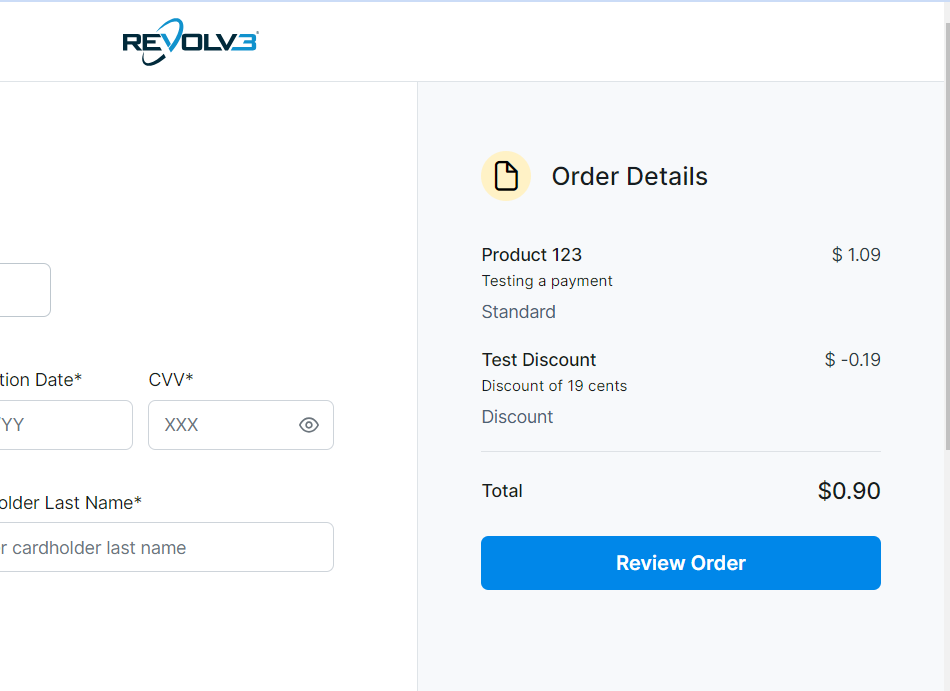
**Calculation**:
* Product 123: \$1.09
* Discount: -\$0.19
* **Total: \$0.90**
**Display on checkout**:
* Product 123: **\$1.09**
* Test Discount: **-\$0.19** (shown in red or with minus sign)
* **Total: \$0.90**
 ## Percentage Discounts
**DiscountPercentage** applies a percentage discount to the total.
### Example: 19% Discount
```json theme={null}
{
"CheckoutLineItems": [
{
"Name": "Product 123",
"Description": "Testing a payment",
"Value": 1.09,
"ValueType": "Standard"
},
{
"Name": "% Discount",
"Description": "19% promotional discount",
"Value": 19,
"ValueType": "DiscountPercentage"
}
]
}
```
**Calculation**:
* Product 123: \$1.09
* 19% discount: \$1.09 × 0.19 = \$0.21 (rounded)
* **Total: \$0.88**
**Display on checkout**:
* Product 123: **\$1.09**
* % Discount: **-19%** (or **-\$0.21**)
* **Total: \$0.88**
## Percentage Discounts
**DiscountPercentage** applies a percentage discount to the total.
### Example: 19% Discount
```json theme={null}
{
"CheckoutLineItems": [
{
"Name": "Product 123",
"Description": "Testing a payment",
"Value": 1.09,
"ValueType": "Standard"
},
{
"Name": "% Discount",
"Description": "19% promotional discount",
"Value": 19,
"ValueType": "DiscountPercentage"
}
]
}
```
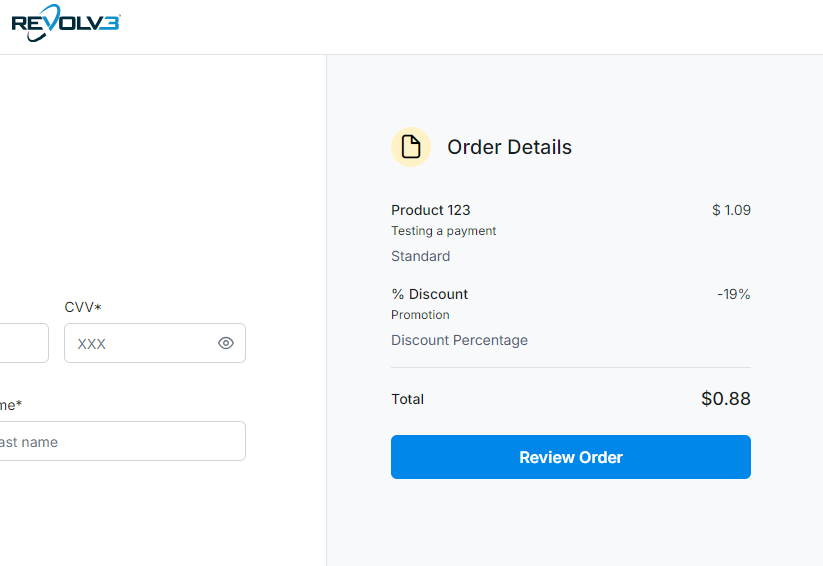
**Calculation**:
* Product 123: \$1.09
* 19% discount: \$1.09 × 0.19 = \$0.21 (rounded)
* **Total: \$0.88**
**Display on checkout**:
* Product 123: **\$1.09**
* % Discount: **-19%** (or **-\$0.21**)
* **Total: \$0.88**
 > **Important**: For percentage discounts, use the whole number (19 = 19%), not a decimal (0.19).
## Price Override
**PriceOverride** sets a specific final price, ignoring all other line item values.
### Example: Override to Specific Price
```json theme={null}
{
"CheckoutLineItems": [
{
"Name": "Product 123",
"Description": "Testing a payment",
"Value": 1.09,
"ValueType": "Standard"
},
{
"Name": "Over-ride",
"Description": "Override the price",
"Value": 0.19,
"ValueType": "PriceOverride"
}
]
}
```
**Calculation**:
* Product 123: \$1.09 (ignored)
* Over-ride: \$0.19 (this becomes the final price)
* **Total: \$0.19**
**Display on checkout**:
* Product 123: **\$1.09** (may be shown but doesn't affect total)
* Over-ride: **\$0.19**
* **Total: \$0.19**
> **Important**: For percentage discounts, use the whole number (19 = 19%), not a decimal (0.19).
## Price Override
**PriceOverride** sets a specific final price, ignoring all other line item values.
### Example: Override to Specific Price
```json theme={null}
{
"CheckoutLineItems": [
{
"Name": "Product 123",
"Description": "Testing a payment",
"Value": 1.09,
"ValueType": "Standard"
},
{
"Name": "Over-ride",
"Description": "Override the price",
"Value": 0.19,
"ValueType": "PriceOverride"
}
]
}
```
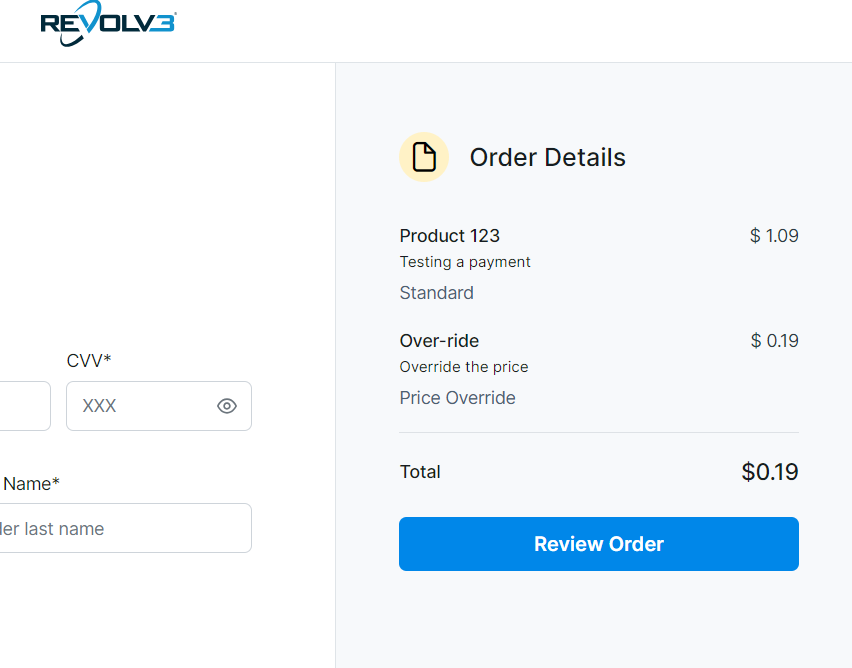
**Calculation**:
* Product 123: \$1.09 (ignored)
* Over-ride: \$0.19 (this becomes the final price)
* **Total: \$0.19**
**Display on checkout**:
* Product 123: **\$1.09** (may be shown but doesn't affect total)
* Over-ride: **\$0.19**
* **Total: \$0.19**
 **When to use**: Special pricing, promotional offers, or when you need to set an exact final amount regardless of other items.
## Final Discount (Subscriptions Only)
**FinalDiscount** applies a discount to the final payment in a subscription. This is only available for subscription checkouts.
**Feature Status**
FinalDiscount for subscriptions is coming soon. This value type will be implemented for future subscription checkout pages.
## Real-World Examples
### Example 1: E-Commerce Order
**Scenario**: Product with shipping and tax
```json theme={null}
{
"CheckoutLineItems": [
{
"Name": "Premium Widget",
"Description": "Blue premium widget",
"Value": 50.00,
"ValueType": "Standard"
},
{
"Name": "Shipping",
"Description": "Standard shipping",
"Value": 5.00,
"ValueType": "Standard"
},
{
"Name": "Tax",
"Description": "Sales tax",
"Value": 4.00,
"ValueType": "Standard"
}
]
}
```
**Total**: \$59.00
### Example 2: Product with Promotional Discount
**Scenario**: \$100 product with \$10 off
```json theme={null}
{
"CheckoutLineItems": [
{
"Name": "Product",
"Value": 100.00,
"ValueType": "Standard"
},
{
"Name": "Promotional Discount",
"Value": 10.00,
"ValueType": "Discount"
}
]
}
```
**Total**: \$90.00
### Example 3: Percentage Off Sale
**Scenario**: \$50 product with 20% off
```json theme={null}
{
"CheckoutLineItems": [
{
"Name": "Product",
"Value": 50.00,
"ValueType": "Standard"
},
{
"Name": "20% Off Sale",
"Value": 20,
"ValueType": "DiscountPercentage"
}
]
}
```
**Total**: \$40.00 (\$50 - 20% = \$40)
## Best Practices
1. **Use clear names**: Make line item names descriptive so customers understand charges
2. **Order matters**: List items in a logical order (products, then discounts, then totals)
3. **Test calculations**: Verify that line items add up to the expected total
4. **Handle overrides carefully**: PriceOverride ignores everything else—use sparingly
5. **Be transparent**: Show customers what they're paying for
## Common Questions
**Q: What's the difference between Discount and DiscountPercentage?**
A: `Discount` is a fixed dollar amount (e.g., \$5 off). `DiscountPercentage` is a percentage (e.g., 10% off).
**Q: Can I combine multiple discounts?**
A: Yes, you can have multiple discount line items. They'll be applied in the order they appear.
**Q: What if I use PriceOverride with other items?**
A: PriceOverride sets the final price and ignores all other line items. Only the override amount matters.
**Q: How are percentages calculated?**
A: Percentage discounts are typically calculated on the subtotal (sum of Standard items) before other discounts.
**Q: Can I use line items for subscriptions?**
A: Yes, subscriptions can have line items on the invoices they generate. See subscription documentation for details.
## Next Steps
* **[Hosted Page](/docs/checkout/hosted-page)** — See how line items appear on hosted checkout
* **[Embedded Checkout](/docs/checkout/embedded)** — Learn about embedded checkout with line items
* **[Checkout Overview](/docs/checkout)** — Return to checkout overview
***
**When to use**: Special pricing, promotional offers, or when you need to set an exact final amount regardless of other items.
## Final Discount (Subscriptions Only)
**FinalDiscount** applies a discount to the final payment in a subscription. This is only available for subscription checkouts.
**Feature Status**
FinalDiscount for subscriptions is coming soon. This value type will be implemented for future subscription checkout pages.
## Real-World Examples
### Example 1: E-Commerce Order
**Scenario**: Product with shipping and tax
```json theme={null}
{
"CheckoutLineItems": [
{
"Name": "Premium Widget",
"Description": "Blue premium widget",
"Value": 50.00,
"ValueType": "Standard"
},
{
"Name": "Shipping",
"Description": "Standard shipping",
"Value": 5.00,
"ValueType": "Standard"
},
{
"Name": "Tax",
"Description": "Sales tax",
"Value": 4.00,
"ValueType": "Standard"
}
]
}
```
**Total**: \$59.00
### Example 2: Product with Promotional Discount
**Scenario**: \$100 product with \$10 off
```json theme={null}
{
"CheckoutLineItems": [
{
"Name": "Product",
"Value": 100.00,
"ValueType": "Standard"
},
{
"Name": "Promotional Discount",
"Value": 10.00,
"ValueType": "Discount"
}
]
}
```
**Total**: \$90.00
### Example 3: Percentage Off Sale
**Scenario**: \$50 product with 20% off
```json theme={null}
{
"CheckoutLineItems": [
{
"Name": "Product",
"Value": 50.00,
"ValueType": "Standard"
},
{
"Name": "20% Off Sale",
"Value": 20,
"ValueType": "DiscountPercentage"
}
]
}
```
**Total**: \$40.00 (\$50 - 20% = \$40)
## Best Practices
1. **Use clear names**: Make line item names descriptive so customers understand charges
2. **Order matters**: List items in a logical order (products, then discounts, then totals)
3. **Test calculations**: Verify that line items add up to the expected total
4. **Handle overrides carefully**: PriceOverride ignores everything else—use sparingly
5. **Be transparent**: Show customers what they're paying for
## Common Questions
**Q: What's the difference between Discount and DiscountPercentage?**
A: `Discount` is a fixed dollar amount (e.g., \$5 off). `DiscountPercentage` is a percentage (e.g., 10% off).
**Q: Can I combine multiple discounts?**
A: Yes, you can have multiple discount line items. They'll be applied in the order they appear.
**Q: What if I use PriceOverride with other items?**
A: PriceOverride sets the final price and ignores all other line items. Only the override amount matters.
**Q: How are percentages calculated?**
A: Percentage discounts are typically calculated on the subtotal (sum of Standard items) before other discounts.
**Q: Can I use line items for subscriptions?**
A: Yes, subscriptions can have line items on the invoices they generate. See subscription documentation for details.
## Next Steps
* **[Hosted Page](/docs/checkout/hosted-page)** — See how line items appear on hosted checkout
* **[Embedded Checkout](/docs/checkout/embedded)** — Learn about embedded checkout with line items
* **[Checkout Overview](/docs/checkout)** — Return to checkout overview
***