> ## Documentation Index
> Fetch the complete documentation index at: https://docs.revolv3.com/llms.txt
> Use this file to discover all available pages before exploring further.
# Authentication
> Learn how to obtain and use your static token (`x-revolv3-token`) to authenticate with the Revolv3 API, including environment setup, required headers, examples, and legacy guidance.
## Authentication Overview
Revolv3 authenticates API requests using the `x-revolv3-token` header. The value sent in that header is your **Developer Static Token**.
For current integrations, this is the recommended authentication method.
Some existing merchants still use legacy authentication flows. Those flows are not recommended for new implementations. If you maintain a legacy setup and need details or migration guidance, contact Revolv3 support through the portal **help icon**.
## Where to Find Your Static Token
Create and manage static tokens in the Revolv3 portal under:
**Settings -> Integration Profile -> Developer Static Tokens**
Use the portal that matches your environment:
| Environment | Portal | API Base URL |
| ----------- | ---------------------------- | --------------------------------- |
| Sandbox | `portal-sandbox.revolv3.com` | `https://api-sandbox.revolv3.com` |
| Production | `portal.revolv3.com` | `https://api.revolv3.com` |
> Sandbox and production credentials are separate. Do not use a sandbox token in production or a production token in sandbox.
### Get Your Token from the Portal
1. Sign in to the correct portal
2. Go to **Settings -> Integration Profile**
3. Find **Developer Static Tokens**
4. Create a token or copy an existing token
5. Store it securely
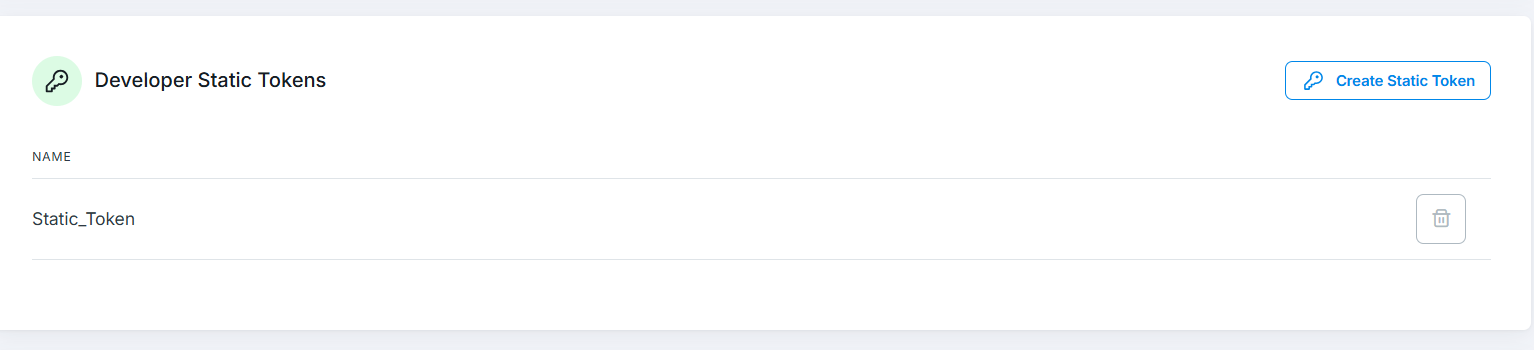 If you do not have access or cannot find the token, log into the portal and use the **help icon** to contact Revolv3 support.
## Required Headers
Include these headers on authenticated API requests:
| Header | Value | Notes |
| ----------------- | ------------------ | ---------------------------------------------- |
| `x-revolv3-token` | Your static token | Required. Primary authentication credential. |
| `Content-Type` | `application/json` | Required for requests with JSON bodies. |
| `Accept` | `application/json` | Recommended so the API returns JSON responses. |
Headers such as `Host` and `Content-Length` are normally set automatically by your HTTP client.
## Example Request
Replace `YOUR_SANDBOX_STATIC_TOKEN` with your actual token. When moving to production, switch both the token and the API host.
```bash theme={null}
curl --location 'https://api-sandbox.revolv3.com/api/payments/sale' \
--header 'Content-Type: application/json' \
--header 'Accept: application/json' \
--header 'x-revolv3-token: YOUR_SANDBOX_STATIC_TOKEN' \
--data '{
"Invoice": {
"Amount": { "Value": 10.00 }
},
"PaymentMethod": {
"CreditCard": {
"PaymentAccountNumber": "4111111111111111",
"ExpirationDate": "1230",
"SecurityCode": "123"
}
}
}'
```
## Postman Example
In Postman, add the token in the **Headers** tab:
If you do not have access or cannot find the token, log into the portal and use the **help icon** to contact Revolv3 support.
## Required Headers
Include these headers on authenticated API requests:
| Header | Value | Notes |
| ----------------- | ------------------ | ---------------------------------------------- |
| `x-revolv3-token` | Your static token | Required. Primary authentication credential. |
| `Content-Type` | `application/json` | Required for requests with JSON bodies. |
| `Accept` | `application/json` | Recommended so the API returns JSON responses. |
Headers such as `Host` and `Content-Length` are normally set automatically by your HTTP client.
## Example Request
Replace `YOUR_SANDBOX_STATIC_TOKEN` with your actual token. When moving to production, switch both the token and the API host.
```bash theme={null}
curl --location 'https://api-sandbox.revolv3.com/api/payments/sale' \
--header 'Content-Type: application/json' \
--header 'Accept: application/json' \
--header 'x-revolv3-token: YOUR_SANDBOX_STATIC_TOKEN' \
--data '{
"Invoice": {
"Amount": { "Value": 10.00 }
},
"PaymentMethod": {
"CreditCard": {
"PaymentAccountNumber": "4111111111111111",
"ExpirationDate": "1230",
"SecurityCode": "123"
}
}
}'
```
## Postman Example
In Postman, add the token in the **Headers** tab:
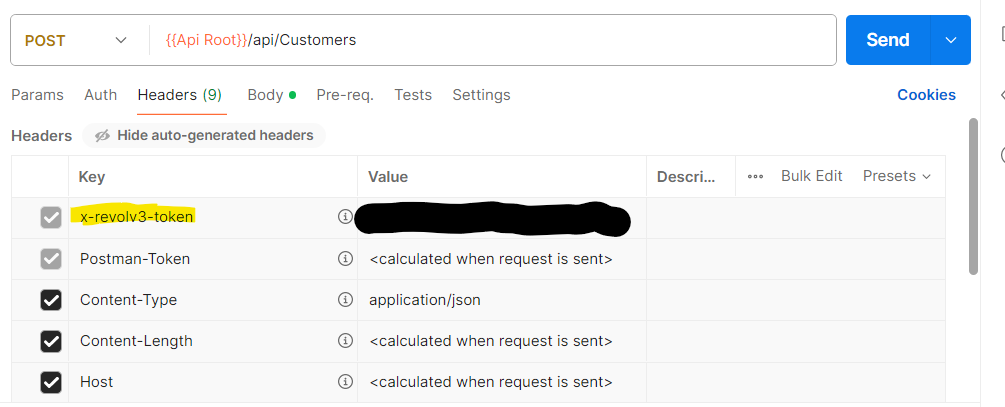 1. Add `x-revolv3-token` with your static token as the value
2. Add `Content-Type: application/json`
3. Optionally add `Accept: application/json`
## Legacy Authentication
Some older integrations use a legacy bearer-token flow instead of static tokens.
* This flow is deprecated
* New integrations should not use it
* Existing legacy integrations should contact Revolv3 support for details or migration guidance
## Security Best Practices
* Store tokens in environment variables or a secrets manager
* Never embed tokens in frontend or mobile code
* Never commit tokens to source control
* Never log full token values
* Keep separate sandbox and production credentials
* Rotate tokens using a staged deployment process
For broader credential-handling guidance, see [Security Best Practices](/docs/authentication-security/security-best-practices).
## Common Authentication Errors
### 401 Unauthorized
Common causes:
* Missing `x-revolv3-token`
* Invalid token value
* Sandbox token used against production, or vice versa
### "Attempted to perform an unauthorized operation"
This usually means the credential was accepted, but it does not have permission for the requested operation.
### 415 Unsupported Media Type
This usually means `Content-Type: application/json` is missing or incorrect on a JSON request.
When contacting support, include:
* request timestamp
* target environment
* request path
* server-side request headers
* redacted request body
## Next Steps
* [**Getting Started with Revolv3**](/docs/getting-started/getting-started) -> Start your first integration flow
* [**Make a Payment**](/docs/getting-started/make-a-payment) -> Use your token in a real API request
* [**Security Best Practices**](/docs/authentication-security/security-best-practices) -> Protect credentials in production
***
1. Add `x-revolv3-token` with your static token as the value
2. Add `Content-Type: application/json`
3. Optionally add `Accept: application/json`
## Legacy Authentication
Some older integrations use a legacy bearer-token flow instead of static tokens.
* This flow is deprecated
* New integrations should not use it
* Existing legacy integrations should contact Revolv3 support for details or migration guidance
## Security Best Practices
* Store tokens in environment variables or a secrets manager
* Never embed tokens in frontend or mobile code
* Never commit tokens to source control
* Never log full token values
* Keep separate sandbox and production credentials
* Rotate tokens using a staged deployment process
For broader credential-handling guidance, see [Security Best Practices](/docs/authentication-security/security-best-practices).
## Common Authentication Errors
### 401 Unauthorized
Common causes:
* Missing `x-revolv3-token`
* Invalid token value
* Sandbox token used against production, or vice versa
### "Attempted to perform an unauthorized operation"
This usually means the credential was accepted, but it does not have permission for the requested operation.
### 415 Unsupported Media Type
This usually means `Content-Type: application/json` is missing or incorrect on a JSON request.
When contacting support, include:
* request timestamp
* target environment
* request path
* server-side request headers
* redacted request body
## Next Steps
* [**Getting Started with Revolv3**](/docs/getting-started/getting-started) -> Start your first integration flow
* [**Make a Payment**](/docs/getting-started/make-a-payment) -> Use your token in a real API request
* [**Security Best Practices**](/docs/authentication-security/security-best-practices) -> Protect credentials in production
***